

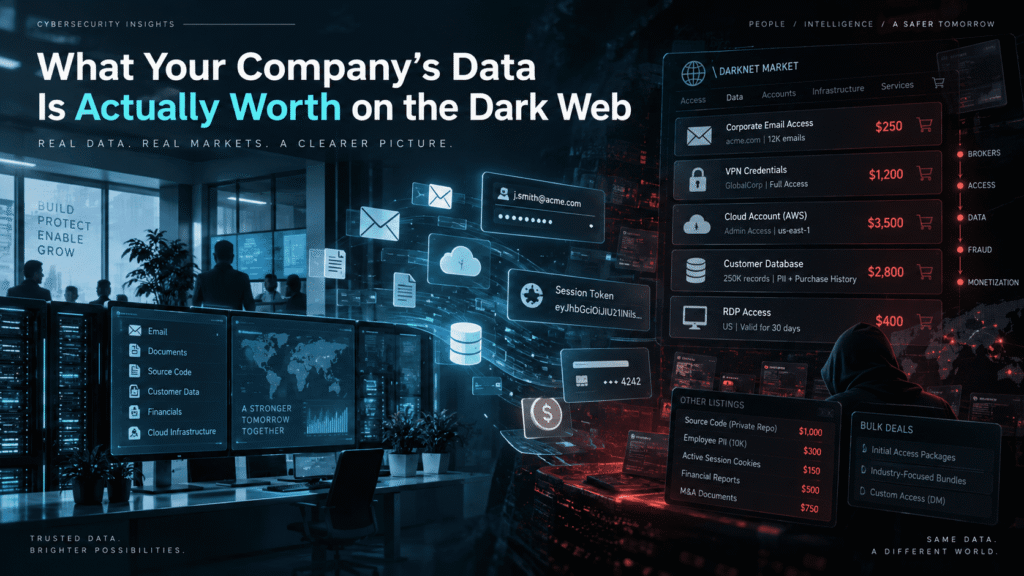
What Your Company’s Data Is Actually Worth on the Dark Web
Usually, the answer is less dramatic and more dangerous than most organizations expect.
Attackers do not need your entire customer database to make money. They may only need one working Microsoft 365 account, an active VPN credential, a browser cookie, a supplier login, or access to an employee mailbox.
Cybercrime markets have become specialized. One criminal steals credentials. Another verifies them. Someone else packages the information. An access broker sells the foothold. A different group may use that access for fraud, espionage, extortion, phishing, or ransomware.
That changes how organizations should think about stolen data.
The value of compromised information rarely comes from the file itself. Value comes from what an attacker can do with it.
A spreadsheet containing employee email addresses may have little direct resale value. Combine it with passwords, job titles, internal systems, session tokens, supplier information, and executive relationships, and the situation changes quickly.
Understanding that distinction helps security teams prioritize protection, monitoring, and employee awareness.
What Determines Your Company’s Data Value on the Dark Web?
There is no universal price list for stolen corporate information.
Cybercriminals assess data much like legitimate buyers assess any asset. They look at usefulness, exclusivity, freshness, reliability, and the effort required to turn it into money.
Several factors influence the value.
Freshness
Fresh credentials usually matter more than old credentials.
A password stolen yesterday has a better chance of working than one collected two years ago. The same applies to session cookies, authentication tokens, VPN access, and remote desktop credentials.
Cybercriminals know that companies reset passwords, disable employees, change infrastructure, and rotate authentication secrets.
Fresh access creates urgency.
Level of Access
Not every compromised account carries the same risk.
An account belonging to an intern with limited permissions differs from an account belonging to:
- A system administrator
- Finance personnel
- Human resources
- IT support
- Procurement
- A developer
- A cloud administrator
- An executive assistant
- Senior management
Privileged accounts can expose additional systems.
Finance accounts can support invoice fraud.
HR accounts may contain identity documents and employee records.
Executive mailboxes provide context for convincing impersonation attacks.
Attackers care about what the account can reach, not just the username and password.
Authentication Requirements
An account protected only by a password can be easier to abuse.
Multi-factor authentication changes the attacker’s job. However, MFA does not make accounts impossible to compromise.
Attackers may use phishing proxies, session theft, social engineering, OAuth abuse, stolen browser data, or MFA fatigue techniques.
The type of authentication affects how useful stolen credentials become.
Organization Size
A working credential from a large enterprise may attract more interest because the potential impact can be greater.
Large organizations often have:
- More employees
- Larger payment flows
- More suppliers
- More internal systems
- More cloud services
- More privileged identities
- Larger cyber insurance policies
- Greater operational dependence on IT
Small businesses are not ignored, though.
They may have weaker controls, fewer security employees, and greater reliance on individual accounts.
Attackers often care more about opportunity than brand recognition.
Industry
Some sectors naturally hold information that supports fraud or further attacks.
Examples include:
- Financial services
- Healthcare
- Manufacturing
- Legal services
- Technology
- Telecommunications
- Logistics
- Retail
- Government contractors
- Professional services
Industry also affects operational value.
Access to a manufacturer may expose production systems.
Access to a law firm may reveal confidential client material.
Access to a managed service provider may lead to multiple customers.
Ease of Monetization
The easiest information to monetize often attracts the most interest.
A complete customer list may require additional effort before it produces income.
A working corporate mailbox can immediately support:
- Business email compromise
- Password resets
- Supplier impersonation
- Internal phishing
- Intelligence gathering
- Account recovery
- Payment manipulation
Criminal markets reward usability.
Stolen Data Is Often Worth More as Access Than Information
Security discussions often focus on breached databases.
That view misses one of the most important developments in cybercrime.
Attackers increasingly trade access.
Instead of selling a large archive of stolen files, a criminal may advertise a working entry point into an organization.
That access might include:
- VPN credentials
- Remote desktop access
- Cloud accounts
- Citrix credentials
- Microsoft 365 accounts
- Administrator accounts
- Web application panels
- Hosting control panels
- Developer environments
- Remote monitoring tools
This model creates an underground supply chain.
An initial access broker does not need to deploy ransomware. The broker only needs to compromise an organization, confirm access, describe the environment, and find a buyer.
The buyer decides what happens next.
This separation makes attacks more scalable.
It also explains why a seemingly minor credential leak deserves attention. The criminal who finds the credential may have no interest in your organization.
The buyer might.
Credentials: The Basic Currency of Cybercrime
Credentials remain one of the most useful forms of stolen corporate data.
Employees reuse passwords.
They sign into work services from personal devices.
They store passwords in browsers.
They install software that may contain malware.
They enter credentials into convincing phishing pages.
Any of these actions can create exposure.
Corporate Email Credentials
Corporate email accounts provide more than communication.
A mailbox often reveals:
- Internal conversations
- Customer relationships
- Supplier contacts
- Invoice processes
- Meeting schedules
- Organizational structure
- Travel plans
- Password reset messages
- Security notifications
- Internal terminology
This information helps attackers impersonate legitimate employees.
A mailbox can also become a platform for further attacks.
Instead of sending phishing emails from an obviously suspicious domain, the attacker may send them from a genuine corporate account.
That changes how recipients perceive the message.
VPN Credentials
VPN access can provide a direct path toward internal infrastructure.
Attackers may test whether stolen credentials work, identify accessible systems, and search for privilege escalation opportunities.
A VPN account becomes more valuable when:
- MFA is absent
- Access controls are broad
- Network segmentation is weak
- The account has elevated privileges
- Internal services trust VPN users
- Monitoring is limited
A single credential does not guarantee compromise.
Still, it can remove one major barrier.
Remote Desktop Credentials
Remote desktop access can be particularly useful when exposed services remain reachable from the internet.
Criminals may attempt credential stuffing against these systems.
They may also buy verified access from another attacker.
Once authenticated, the intruder has an interactive environment inside the organization.
That can make later stages easier.
Administrator Credentials
Privileged accounts sit at another level.
Domain administrators, cloud administrators, backup administrators, and security administrators can provide extensive control.
Attackers may use privileged access to:
- Create new accounts
- Disable security controls
- Access sensitive systems
- Extract additional credentials
- Alter configurations
- Delete logs
- Reach backups
- Expand across the network
Privileged credentials are valuable because they reduce the amount of additional work needed.
Session Cookies and Tokens Can Be More Useful Than Passwords
Passwords receive most of the attention during awareness training.
Attackers understand that authenticated sessions can be just as useful.
Modern browsers store large amounts of information.
Malware designed to steal browser data may collect:
- Cookies
- Session tokens
- Saved passwords
- Autofill information
- Browser history
- Cryptocurrency wallet information
- Device details
Session theft matters because authentication may have already happened.
The user may have entered the correct password.
The user may also have completed MFA.
If an attacker steals a valid authenticated session, some services may accept that session without immediately asking for another authentication step.
Security controls vary between platforms, so session theft does not always succeed.
Still, organizations should treat stolen browser data seriously.
Resetting only the password may not end every active session.
Security teams should consider token revocation, session termination, endpoint investigation, and additional authentication reviews.
Infostealer Logs Have Changed Credential Exposure
Information-stealing malware has created a steady supply of credentials for underground markets.
These malware families often target individual computers rather than attacking corporate infrastructure directly.
That distinction matters.
Imagine an employee uses a personal Windows laptop at home.
The employee logs into:
- Corporate webmail
- A project management platform
- A company VPN portal
- A supplier dashboard
- A personal social media account
Later, the employee installs pirated software that contains an information stealer.
The malware collects saved browser passwords, cookies, device information, and browsing data.
The company’s perimeter was never breached.
Its firewall was never exploited.
Its email server was never directly attacked.
Yet corporate credentials may now exist inside an infostealer log.
This is why dark web monitoring should look beyond traditional breach announcements.
Corporate exposure can originate from employee endpoints, third parties, personal devices, reused passwords, contractors, and unrelated websites.
A Realistic Scenario: One Marketing Account Becomes a Finance Attack
Consider a mid-sized company with several hundred employees.
A marketing employee uses a corporate Microsoft 365 account. The same employee occasionally works from a personal computer.
That computer becomes infected with information-stealing malware after the employee installs an unofficial software package.
The attacker collects:
- The employee’s email address
- A saved password
- Browser cookies
- Device information
- Browsing history
- Several saved web credentials
The malware operator does not target the company directly.
Instead, the stolen data becomes part of a larger collection.
Another criminal searches those logs for corporate domains and finds the employee’s account.
The attacker tests access.
The password no longer works because the company recently forced a reset.
One browser session, however, remains useful long enough to expose mailbox content.
The attacker reads several weeks of messages.
They identify the company’s finance manager, CEO, external suppliers, payment terminology, and approval process.
They also learn that the company regularly pays a particular technology vendor.
The attacker does not immediately request money.
Instead, the attacker watches the mailbox.
A week later, the employee receives a legitimate supplier discussion.
The attacker now has enough context to create a believable impersonation attempt.
A finance employee receives a message that appears connected to an existing business conversation.
The language matches internal terminology.
The supplier name is correct.
The employee names are correct.
The requested payment format looks normal.
The original compromised marketing account had no financial authority.
Its value came from intelligence.
That intelligence supported another attack.
This is why assigning value based only on an account’s permissions can be misleading.
Context has value.
Employee Databases Are Building Blocks for Social Engineering
Employee information may look harmless compared with passwords or financial records.
Attackers can still use it effectively.
A database containing names, titles, departments, telephone numbers, and email addresses provides a map of the organization.
The attacker can identify:
- Executives
- Finance employees
- IT administrators
- HR personnel
- Executive assistants
- New employees
- Procurement staff
- Help desk employees
The next step becomes targeting.
A criminal might impersonate the CEO to finance.
Another may impersonate an employee when calling IT support.
A phishing campaign may target only people with access to a specific system.
This is the difference between mass phishing and informed social engineering.
The message does not need sophisticated malware.
It only needs enough context to appear legitimate.
Customer Data Has Different Forms of Value
Customer databases attract attention because they contain structured information.
Their value depends heavily on what they contain.
A basic marketing database may include:
- Name
- Email address
- Company
- Job title
- Telephone number
A richer customer record may contain:
- Home address
- Date of birth
- Purchase history
- Account details
- Authentication information
- Support tickets
- Financial information
- Identification documents
Attackers may use this information for phishing, identity fraud, account takeover, extortion, or resale.
The danger increases when datasets can be combined.
An email address from one breach may connect with a password from another source and a phone number from a third.
Criminals do not always need one perfect database.
They can build profiles from multiple leaks.
Financial Data Has Immediate Criminal Utility
Financial information can support direct fraud.
Attackers look for data that helps them understand how money moves.
Useful information may include:
- Bank account details
- Invoice templates
- Supplier records
- Purchase orders
- Payment schedules
- Finance department contacts
- Approval workflows
- Tax documents
- Corporate card details
This data becomes more dangerous when paired with mailbox access.
An attacker can learn how invoices look and when they are expected.
The attacker may then impersonate a supplier and request updated bank information.
The attack appears stronger because it uses real context.
Business email compromise often relies on this combination of technical access and social engineering.
Source Code and Developer Access Have Strategic Value
Source code creates a different form of exposure.
An attacker may search repositories for:
- Hardcoded credentials
- API keys
- Internal URLs
- Database connection strings
- Cloud secrets
- Authentication logic
- Infrastructure configuration
- Private documentation
Source code may also help attackers understand how an application works.
That knowledge can support vulnerability research.
Developer access can be even more useful than the code itself.
A compromised developer identity may provide access to repositories, CI/CD systems, cloud platforms, ticketing systems, and internal documentation.
This is why secrets management matters.
Credentials should not live permanently inside source code.
Organizations should also monitor repositories for exposed secrets and revoke compromised keys quickly.
API Keys and Cloud Credentials Can Create Direct Access
API keys may look like random strings.
To an attacker, they can represent direct access to services.
The impact depends on the permissions attached to the key.
A restricted API token may expose little.
An overly privileged cloud credential can create serious risk.
Attackers may use exposed credentials to:
- Access storage
- Query databases
- Launch resources
- Read logs
- Send email
- Modify infrastructure
- Access customer information
- Create additional credentials
Security teams should treat machine identities with the same seriousness as human identities.
Service accounts often receive less attention because nobody “logs in” with them during daily work.
Attackers do not care about that distinction.
Internal Documents Help Attackers Understand the Business
Not every valuable file contains passwords.
Internal documents can explain how an organization operates.
Examples include:
- Network diagrams
- Security procedures
- Business continuity plans
- Supplier lists
- Incident response documents
- Employee directories
- IT architecture documents
- Internal audit reports
- Vulnerability reports
- Penetration test reports
- Acquisition plans
A penetration test report can be particularly sensitive.
It may describe vulnerabilities that the organization has not fixed yet.
It can also reveal internal IP addresses, technologies, authentication methods, and system relationships.
The information saves attackers time.
Instead of discovering the environment from scratch, they receive a partial map.
Personal Data Can Support Attacks Against Employees
Corporate breaches often expose personal information alongside business data.
Attackers may use employee information to strengthen social engineering.
Useful details might include:
- Personal email addresses
- Phone numbers
- Home addresses
- Birth dates
- Emergency contacts
- Payroll details
This information can support targeted phishing and impersonation.
For example, an attacker contacting IT support may know the employee’s name, department, manager, phone number, and corporate email address.
That does not prove identity.
However, it can make the caller sound credible.
Help desk procedures should never treat easily obtainable personal information as strong authentication.
Why Dark Web Prices Can Be Misleading
Security teams sometimes ask a simple question:
“What is this database worth?”
That question has limits.
The advertised price of stolen data does not represent the potential business impact.
A credential sold cheaply could eventually contribute to a major incident.
At the same time, a criminal may advertise stolen data at an unrealistic price and never find a buyer.
Underground markets contain fraud, recycled datasets, fake listings, and duplicate material.
Cybercriminals scam each other too.
Price should therefore remain secondary.
The security team should ask:
- Is the information genuine?
- Is it current?
- Does it belong to us?
- What systems could it affect?
- Does the exposed credential still work?
- What permissions does the identity have?
- Where did the exposure originate?
- Can an attacker combine it with other data?
Those questions lead to action.
Dark Web Monitoring Is Not Just About Finding Databases
Many people imagine dark web monitoring as searching forums for a company name.
That is only one part of the problem.
Corporate exposure can appear in several forms.
Security teams may need visibility into:
- Breach collections
- Credential dumps
- Infostealer logs
- Underground forums
- Criminal marketplaces
- Paste sites
- Leaked documents
- Compromised accounts
- Domain-related credentials
The purpose is not simply to collect alerts.
The goal is to identify exposures that require action.
Ten thousand old email addresses may matter less than one fresh administrator credential.
Alert quality matters more than alert volume.
Your Company’s Data Is Actually Worth What It Enables
The phrase your company’s data is actually worth on the dark web can create the wrong mental model if value means only resale price.
The better question is what the data enables.
A stolen email address may enable phishing.
A password may enable account takeover.
A session token may bypass another authentication step.
A finance mailbox may enable payment fraud.
A VPN credential may create internal network access.
A developer token may expose cloud infrastructure.
A supplier list may support impersonation.
An executive calendar may reveal the perfect timing for an attack.
Attackers combine these elements.
That creates compound value.
Data Aggregation Makes Small Leaks More Dangerous
One leak rarely tells the entire story.
Attackers can collect information across years.
Suppose an employee appears in several datasets.
One source contains:
Another contains:
[email protected] : Password123
A third exposes a mobile number.
A public social profile shows the employee works in finance.
A corporate website identifies the CFO.
None of these pieces guarantees compromise.
Together, they create a useful profile.
The attacker can test password reuse.
If that fails, the attacker can launch targeted phishing.
If phishing fails, the attacker may attempt phone-based social engineering.
Security teams should therefore avoid evaluating incidents in isolation.
Exposure accumulates.
Third Parties Can Increase Your Dark Web Exposure
Organizations depend on vendors.
Those relationships create another path for data leakage.
Third parties may store:
- Employee information
- Customer data
- Credentials
- API keys
- Shared documents
- Support records
- Infrastructure details
A supplier compromise may expose information about your company even when your own environment remains secure.
The same applies to contractors.
External consultants often receive temporary access that slowly becomes permanent.
Former vendors may still hold outdated credentials or internal files.
Security teams should maintain visibility into external relationships and remove access when it is no longer needed.
Vendor risk is not just a compliance issue.
It is an attack surface issue.
Why Password Reuse Multiplies the Problem
Password reuse turns unrelated breaches into corporate security problems.
Suppose an employee creates an account on an unrelated consumer website using a work email address.
The employee reuses the same password used elsewhere.
That website suffers a breach.
Attackers now have a username and password pair.
Automated tools can test the credential against other services.
This process is known as credential stuffing.
The original breach did not involve the employer.
The employer still faces risk.
Unique passwords reduce this problem significantly.
Password managers make unique credentials easier to maintain.
MFA provides another layer, although organizations should still respond when valid credentials appear in criminal datasets.
A leaked password remains a security signal even when MFA blocks immediate access.
The Human Factor Still Matters
Technical controls cannot eliminate every attack path.
Criminals often switch tactics when one technique fails.
If MFA blocks a stolen password, the attacker may call the employee.
If email filtering blocks a malicious link, the attacker may use a QR code.
If the employee refuses, the attacker may impersonate IT support.
This adaptability makes employee awareness important.
Effective awareness training should teach employees how attacks actually unfold.
That includes understanding:
- Credential phishing
- MFA manipulation
- Business email compromise
- Vishing
- QR phishing
- Fake login pages
- Supplier impersonation
- Urgent payment requests
- Password reset scams
Recognition improves when employees repeatedly encounter realistic examples.
A yearly slideshow rarely creates that level of familiarity.
What Security Teams Can Do Right Now
Organizations cannot prevent every credential from appearing in a breach.
They can reduce the chance that exposed information becomes useful.
A practical program should combine identity security, monitoring, endpoint protection, and employee awareness.
1. Monitor Corporate Credential Exposure
Watch for credentials associated with your domains.
Prioritize alerts involving:
- Current employees
- Privileged accounts
- Executives
- Finance teams
- IT administrators
- Remote access services
- Cloud platforms
Do not treat every alert equally.
Investigate based on potential impact.
2. Force Unique Passwords
Encourage or require password manager use.
Prevent known compromised passwords where your identity platform supports it.
Do not rely on frequent password rotation alone.
A strong unique password provides more value than repeatedly changing one weak pattern.
3. Strengthen MFA
Use phishing-resistant authentication where practical.
Security keys and modern passkey-based authentication can reduce exposure to common phishing methods.
Where stronger methods are unavailable, configure MFA carefully.
Monitor unusual authentication events.
4. Revoke Sessions After Credential Compromise
Changing a password may not invalidate every authenticated session.
Incident response procedures should include:
- Password reset
- Session revocation
- Token review
- MFA review
- Endpoint investigation
- Sign-in log analysis
The exact process depends on the platform.
5. Protect Privileged Accounts Separately
Administrators should not use privileged accounts for routine email or web browsing.
Use separate identities for elevated tasks.
Limit administrative access.
Monitor privileged authentication closely.
6. Reduce Exposed Secrets
Scan code repositories for credentials and tokens.
Rotate exposed secrets quickly.
Use secret management platforms where possible.
Avoid hardcoded credentials.
7. Review Third-Party Access
Identify accounts belonging to contractors and suppliers.
Disable unused access.
Set expiration dates for temporary permissions.
Review vendor integrations and API connections.
8. Train Employees With Realistic Scenarios
Training should reflect the attacks employees actually face.
Test scenarios such as:
- Microsoft 365 credential phishing
- Supplier invoice fraud
- Password reset requests
- Fake IT support
- MFA approval requests
- Executive impersonation
Measure behavior over time.
The goal is improvement, not punishment.
9. Build a Dark Web Alert Response Process
Finding leaked credentials means little without a response process.
Define who receives alerts.
Define escalation criteria.
Document actions for exposed users.
Track remediation.
High-risk credentials should create immediate security actions rather than another ticket in a backlog.
Do Not Measure Risk by the Criminal’s Asking Price
A company should not feel safe because its stolen data appears inexpensive.
A low underground price can actually indicate that stolen credentials have become easy to obtain.
The financial impact occurs later.
The cost may come from:
- Fraud
- Business interruption
- Incident response
- Legal work
- Customer notifications
- Recovery costs
- Account compromise
- Intellectual property exposure
- Ransomware
- Lost business
The criminal marketplace price measures what another criminal might pay.
It does not measure your potential loss.
Security teams should focus on exploitability.
What Executives Should Understand
Executives do not need to study underground marketplaces.
They should understand the business model.
Corporate data can enter criminal ecosystems without a dramatic network breach.
An employee device can leak credentials.
A supplier can expose documents.
A forgotten account can remain accessible.
A browser session can be stolen.
An old breach can support new phishing.
Security controls must therefore extend beyond the traditional network perimeter.
Identity, endpoint security, awareness training, exposure monitoring, and incident response now overlap.
The organization should treat them as connected layers.
Where Cruxroot Fits
Knowing that stolen credentials exist is useful.
Knowing what to do about them is better.
Cruxroot approaches the problem from both sides.
Dark web monitoring can help organizations identify exposed corporate credentials and related risk signals before they quietly become part of another attack.
Phishing simulations test how employees respond when attackers use the same techniques found in real campaigns.
Gamified security training then reinforces safer behavior without turning awareness into a yearly compliance exercise.
For MSPs and security providers, this creates a practical way to extend security awareness and exposure monitoring across multiple enterprise customers.
The goal is not to promise that every threat can be detected.
No platform can make that promise.
The goal is to reduce the number of opportunities attackers can successfully use.
Conclusion
Your company’s data does not have one fixed dark web value.
Its value changes depending on freshness, access level, context, permissions, and the attacker’s objective.
Sometimes the most dangerous exposure is not a massive database.
It is one valid credential.
One active session.
One internal document.
One supplier relationship.
One mailbox containing enough context to make the next attack believable.
That is why security teams should focus less on what criminals charge for stolen data and more on what the data allows them to do.
Monitor exposure.
Protect identities.
Limit privileges.
Revoke compromised sessions.
Train employees against realistic attacks.
Then assume that even small pieces of stolen information can become valuable when an attacker knows how to combine them.
Check our latest the blog regarding Vishing 2.0: Ai Voice Cloning
