

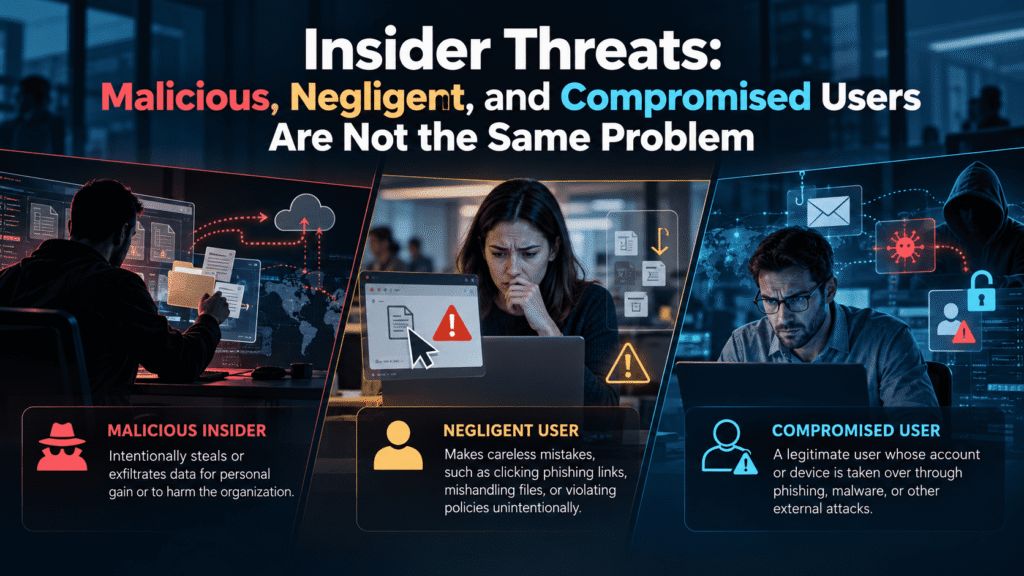
Insider Threats: Malicious, Negligent, and Compromised Users Are Not the Same Problem
Most security teams use the phrase “insider threats” as if it describes one problem. It does not. It describes at least three, and they have almost nothing in common except the badge or login involved.
A disgruntled engineer copying source code is an insider threat. So is a well-meaning accountant who emails a payroll file to the wrong person. So is an employee whose password was stolen last month and now belongs to someone in another country. The first acts on purpose. The second makes a mistake. The third does nothing at all, because someone else is using their identity.
If you lump these together, you build a program that handles none of them well. This article separates them, shows how each one looks in practice, and explains what your team can do about each. It ends with a short look at how awareness training, phishing simulations, and dark web monitoring fit into the picture.
Why the Label “Insider Threat” Causes Confusion
The term sounds simple. Someone inside the organization causes harm. But that definition hides the single most important question: why did the harm happen?
Intent changes everything. Intent decides which controls work, which conversations to have, and who should be involved. The right response to a malicious insider involves legal, HR, and forensics. The right response to a negligent one involves coaching and better process. The right response to a compromised account involves rapid containment and credential hygiene.
When teams treat all three as one category, two common failures follow. The first is an overly punitive culture. Leaders hear “insider threat” and picture a villain, so they respond with monitoring and discipline. Employees who made an honest mistake learn to hide it. Hidden mistakes become larger incidents.
The second failure is the opposite. Leaders decide that most insider incidents are accidents, so they invest only in training. That leaves the organization blind to the rare but costly person who is actually working against it.
Neither approach is wrong in isolation. Both are incomplete. A mature program accepts that three different problems share one label and builds a separate response for each.
The Malicious Insider: Intent, Access, and Opportunity
Malicious insiders are the category people picture first. They are also the smallest category by volume. Most security professionals will tell you that deliberate, hostile insiders are less common than careless or compromised ones. But when they act, the damage can be severe, because they know where valuable data lives and how to avoid attention.
What drives them
Motivation varies. Some are financially driven. They sell data, take bribes, or steal intellectual property to start a competing business. Some are angry. A missed promotion, a bad review, or a pending layoff can turn resentment into action. Some are ideological. Others are recruited or pressured by outside parties.
The common thread is a decision. The person weighs the risk, accepts it, and acts. That decision often follows a visible period of change, though not always.
How they operate
A malicious insider already has legitimate access, so they rarely need to break anything. They use what they have. They download customer lists before resigning. They forward documents to personal accounts. They copy files to removable media. They abuse administrative rights to look at data they have no business seeing.
Skilled ones stay slow and quiet. They collect small amounts over weeks instead of large amounts in one night. They work during normal hours. They avoid tools that would trigger obvious alerts.
Why they are hard to catch
Their activity looks like work. A sales director exporting a contact list is doing something sales directors do. A database administrator running broad queries is doing something administrators do. Detection depends on context, not on any single event. Was the export normal for this person? Was the timing unusual? Did it follow a resignation notice or a performance dispute?
This is why technology alone struggles here. Tools can flag unusual volume or destination. They cannot read intent. People can, but only if the organization has a working relationship between security, HR, and management.
What helps most
Least-privilege access limits how much any one person can take. Logging on sensitive data stores creates a record. Clear offboarding procedures remove access promptly. Separation of duties makes it harder for one person to act alone. None of these stop a determined insider outright. They raise the cost and shrink the window.
The Negligent Insider: Good People, Predictable Mistakes
Negligent insiders are the largest group in most organizations. They are not hostile. They are busy, distracted, or untrained, and they take shortcuts that create risk.
What negligence looks like
The examples are ordinary. An employee sends a spreadsheet to the wrong “Alex” because autocomplete filled in the address. A manager shares a document link set to “anyone with the link” because it was faster. A contractor stores credentials in a shared note. A staff member uses a personal cloud drive to move large files home. A new hire clicks “allow” on a prompt without reading it.
None of these people wanted to cause harm. Many would be horrified to learn what they did. That reaction matters, because it tells you how to respond.
Why it keeps happening
Security rules often fight against how people work. If the approved file-sharing tool is slow and a personal one is fast, people will use the fast one. If reporting a mistake leads to a lecture, people stop reporting. If training is a yearly slideshow, people forget it by February.
Negligence is mostly a design problem, not a character problem. When the secure path is the hard path, some employees will choose the easy one. You can blame them, or you can make the secure path easier.
The role of awareness
Training helps here more than anywhere else, but only if it is practical and frequent. A short, specific lesson about a real behavior beats a long, generic course. People need to recognize a risky situation in the moment, not recite policy from memory.
Culture matters as much as content. Employees who feel safe reporting a mistake will report it quickly. Quick reports shrink incidents. A person who emails the wrong file and tells security within minutes gives you a chance to recall the message. A person who stays quiet for three days does not.
What does not help
Punishment rarely reduces negligence. It tends to push it underground. Blanket restrictions can also backfire, since people route around controls that block legitimate work. The better approach combines clear guidance, usable tools, light-touch guardrails such as warnings on external sharing, and a culture that treats early reporting as a good thing.
The Compromised Insider: The Account Is Inside, the Person Is Not
The third category is the one most often misunderstood. A compromised insider is not really acting at all. An outside attacker controls their credentials, device, or session and uses that access to move through the environment.
From the network’s point of view, the activity comes from a trusted user. From the user’s point of view, nothing unusual happened. That gap is exactly what attackers want.
How accounts get compromised
The most common routes are not exotic. Phishing emails trick employees into entering credentials on a fake login page. Password reuse lets attackers take a password leaked from one service and try it against corporate systems. Malware on a personal or work device captures sessions and keystrokes. Attackers sometimes persuade a target to approve a multi-factor prompt by sending repeated requests until the person gives in.
Once the attacker has access, they act quietly. They read email to learn who approves payments. They create forwarding rules to copy messages elsewhere. They search for files with words like “invoice,” “credentials,” or “confidential.” They look for ways to move from one account to a more privileged one.
Why this category is growing in importance
Identity has become the main perimeter. Employees work from many locations, on many devices, using many cloud services. A valid login is often all an attacker needs. That makes stolen credentials one of the most valuable things on the criminal market, and it explains why so many incidents begin with a quiet, successful login instead of a loud technical exploit.
The key difference
The compromised insider is a victim first. Treating them like a suspect is a mistake. The employee who clicked a convincing phishing email needs support, a password reset, and a short conversation about what happened. They do not need a disciplinary meeting.
At the same time, speed matters. A compromised account can cause serious harm within hours. Detection and containment are the priorities, and both depend on knowing what normal looks like for each user.
One Week, Three Incidents: A Realistic Scenario
The following is a composite example, built from patterns security teams see regularly. It shows how three very different events can land on the same desk in the same week.
Picture a regional logistics company with about 600 employees. It manages freight for retail clients and holds customer pricing, vendor banking details, and shipment data. The security team is small: two analysts and a manager, supported by an MSP partner.
Monday: the forwarded spreadsheet
A security analyst notices an outbound email from an accounts payable specialist, Priya, to a personal webmail address. The attachment is a spreadsheet of vendor payment details. The analyst checks with Priya, who explains right away. She planned to finish reconciliation from home that evening, and her work laptop was in for repair.
Priya broke policy. She also had no bad intent and told the truth immediately. The right response is a calm conversation, deletion of the file from her personal account, and a fix for the real cause: a loaner laptop process for staff whose devices are in repair. This is negligence. The solution is coaching and process.
Wednesday: the departing engineer
On Wednesday, an alert shows that a senior sales engineer, Dan, downloaded an unusually large set of customer pricing files over three evenings. Dan resigned the previous Friday and has a start date at a competitor in three weeks.
The pattern fits a malicious insider. The timing, volume, and recent resignation all point the same way. This is not a coaching moment. The analyst escalates to the security manager, who brings in HR and legal. Access is restricted, logs are preserved, and the company decides how to proceed. The response is formal and documented, because it may become a legal matter.
Friday: the quiet login
On Friday, an analyst reviews a sign-in alert for Marco, a procurement coordinator. His account logged in from a country where the company has no staff, at 3 a.m. local time for Marco. The login succeeded. Shortly afterward, a new inbox rule began forwarding messages containing the word “invoice” to an external address.
Marco knows nothing about it. Two weeks earlier, he reused a password on a third-party site that later suffered a breach. Attackers found the password in leaked data, tried it against the company’s email, and got in. Marco had no multi-factor prompt enabled on that service because it had not yet been rolled out to his group.
The response is fast and technical. Reset credentials, revoke active sessions, remove the forwarding rule, review what the attacker read, and check whether any vendor payment instructions were changed. After the immediate response, someone talks with Marco, kindly, about password reuse and how he can spot suspicious login requests.
What the week teaches
All three incidents involved a trusted account and a data exposure. Yet the correct response differed in tone, speed, stakeholders, and long-term fix. If the team had used a single “insider threat” playbook, at least two of the three would have gone badly. Priya would have been treated like Dan. Marco would have been treated like Priya. Dan might have been handled too softly.
Why One Program Cannot Cover All Three
The scenario points to a larger lesson. Each type of insider threat needs its own mix of people, process, and technology.
Here is how the main elements line up.
For malicious insiders, the strongest tools are access control, activity monitoring on sensitive data, clear offboarding, and a working relationship between security, HR, and legal. Awareness training helps little here, because the person already knows the rules.
For negligent insiders, the strongest tools are practical training, easy-to-use secure tools, warnings at the moment of risk, and a culture that rewards early reporting. Monitoring helps, but only as a safety net.
For compromised insiders, the strongest tools are strong authentication, credential monitoring, anomaly detection, rapid response, and user awareness of phishing and credential theft. Training matters, because many compromises begin with a human decision such as a click or a password choice.
There is overlap. Good logging helps all three. Least privilege limits damage in every case. A reporting culture helps catch negligent and compromised cases early, and sometimes surfaces a malicious one. But the center of gravity is different each time, and a program that ignores those differences wastes effort.
How to Detect Each Type
Detection is where theory meets daily work. Each category leaves different traces.
Signals of malicious activity
Look for behavior that departs from a person’s own baseline, especially around sensitive data. Examples include large downloads outside normal hours, access to files unrelated to the person’s role, use of personal storage or removable media, and repeated attempts to access restricted areas. Context sharpens these signals. A resignation, a conflict, or a change in employment status raises the weight of an otherwise ordinary alert.
Signals of negligence
Negligent behavior often shows up as policy violations that look more like convenience than concealment. Typical signs include sensitive files sent to personal accounts, public sharing links on internal documents, credentials stored in plain text, unapproved cloud tools, and repeated failures in phishing simulations. Patterns across a team can reveal a broken process, not just a careless person.
Signals of compromise
Compromised accounts show different symptoms. Watch for logins from unusual locations or devices, impossible travel between sign-ins, new mailbox rules, sudden changes to multi-factor settings, mass file access, and password resets the user did not request. Credentials appearing in breach data are an early warning, often before any login attempt occurs.
A note on false positives
Every one of these signals produces noise. A salesperson really does travel. An engineer really does work at night. A user really does email files to a personal address because something broke. Detection works best when alerts feed a human review, not an automatic accusation. Keep the first question neutral: what happened, and why?
What Security Teams Can Do Right Now
You do not need a large budget to improve. The following steps work for most mid-sized organizations and can start this quarter.
A practical checklist
- Define the three categories in your policy. Write down what malicious, negligent, and compromised mean in your environment. Assign different response paths to each, with named owners.
- Map your sensitive data. You cannot protect what you cannot find. Identify where customer data, financial records, intellectual property, and credentials live.
- Apply least privilege. Review who can access what. Remove standing access that no longer fits the person’s role. Do this first for finance, HR, and administrative accounts.
- Enforce multi-factor authentication widely. Cover email, remote access, and cloud apps first. Prefer methods that resist prompt fatigue, such as number matching or hardware keys, where practical.
- Tighten offboarding. Remove access on the last day, or earlier for sensitive roles. Review recent activity for departing employees, especially those leaving for competitors.
- Monitor for stolen credentials. Check whether employee email addresses and passwords appear in breach data. Force resets when they do.
- Run regular phishing simulations. Treat results as feedback, not a scoreboard. Follow each simulation with a short, specific lesson.
- Replace annual training with frequent short lessons. Focus on real behaviors: sharing files, handling attachments, spotting fake login pages, reporting mistakes.
- Create a no-blame reporting path. Make it easy and safe to say “I think I made a mistake.” Thank people who do.
- Build the HR and legal link. Agree in advance how security will work with HR and legal on suspected malicious cases. Do not invent the process during an incident.
- Fix the workarounds. When you see people bypassing a control, ask why. Often the approved tool is too slow or too limited.
- Rehearse the response. Run a short tabletop exercise for each category. Three scenarios, one hour each, will expose gaps quickly.
Where to start if you are overwhelmed
If the list feels long, pick three. Enable multi-factor authentication where it is missing. Start monitoring for leaked credentials. Begin short, regular training with phishing simulations. These three steps address the two largest categories, negligent and compromised users, and give you better data to guide the rest.
Measure what matters
Track a few simple indicators. How quickly do employees report suspicious messages? How long does it take to contain a compromised account? How many accounts show up in breach data, and how fast do they get reset? Are repeated simulation failures concentrated in a team, suggesting a process problem? These measures describe behavior and response time, which matter more than raw counts of training completions.
The Human Side: Culture Decides How Well This Works
Technical controls matter. But the quality of an insider threat program depends heavily on how employees feel about security.
When people believe security is there to catch them, they hide things. When people believe security is there to help, they speak up. That difference shows up in incident timelines. A negligent mistake reported in ten minutes is a minor event. The same mistake reported after a week may be a breach.
Leaders set the tone. If executives visibly follow the same rules and respond calmly to mistakes, employees notice. If a senior person gets an exception and a junior person gets punished for the same behavior, employees notice that too.
Trust also supports the response to malicious cases. A workplace with open communication tends to surface warning signs earlier. Colleagues and managers notice behavior changes and know where to take concerns. Security cannot see everything. People can see what systems cannot.
None of this requires surveillance of ordinary work. It requires clear expectations, fair treatment, and tools that make safe behavior easy.
Working With an MSP Partner on Insider Risk
Many organizations lack the staff to run all of this internally. That is where a managed service provider can help. An MSP can bring consistent monitoring, faster response, and experience across many environments.
The relationship works best when responsibilities are explicit. Decide who watches identity alerts, who owns the response to a compromised account, who talks to the employee, and who handles escalation to HR and legal. Ambiguity costs time during an incident.
Your MSP can also help you prioritize. Not every organization needs every control at once. A short assessment can show where the largest gaps sit, whether in access control, authentication, training, or detection. Then the improvement plan can follow a sensible order instead of a shopping list.
How Cruxroot Fits Into the Picture
Cruxroot does not claim to solve every part of the insider threat problem. No single platform does. A determined malicious insider will not be stopped by training, and that case still needs access controls, monitoring, and strong HR and legal processes.
What Cruxroot addresses well is the human side of the two largest categories: negligent and compromised users.
Phishing simulations give employees safe practice against the kinds of messages that lead to stolen credentials. They also show you where risk concentrates, by team, by role, or by type of lure. The point is not to catch people out. The point is to build recognition and a habit of reporting before a real attack arrives.
Dark web monitoring watches for employee credentials that appear in leaked or traded data. This matters for compromised insiders, because a stolen password often surfaces before it gets used. A reset at that stage can prevent the quiet 3 a.m. login described earlier. It will not catch every case, and it works best alongside multi-factor authentication, but it gives your team an early signal that is hard to get another way.
Gamified training replaces the annual slideshow with short, engaging lessons that fit into a normal workday. Employees practice real behaviors, such as handling a suspicious attachment or sharing a file safely, and get quick feedback. Regular, low-friction practice helps the habits stick. That targets negligence directly.
Together, these three capabilities support a program that treats employees as the first line of defense, not the weakest link. They give your team data on where risk sits and give your people the skills to reduce it.
Cruxroot is available through your MSP partner, who can help you match these tools to your environment, your existing controls, and your team’s capacity. If you already run some of this, a short review can show where the gaps are.
Conclusion: Name the Problem Before You Solve It
Insider threats are not one problem with one answer. The malicious insider, the negligent insider, and the compromised insider differ in motive, behavior, detection, and response. Treating them the same wastes effort and often makes outcomes worse.
Start by separating them in your policy and your thinking. Build a distinct response for each. Put your fastest wins into the areas where most incidents begin: authentication, credential monitoring, and practical, repeated training. Keep strong access control and clear offboarding for the cases where intent is hostile.
Most of all, build a culture where people report mistakes quickly and security is seen as support, not suspicion. Your employees will make errors, and attackers will target them. What you control is how prepared they are and how fast you respond.
Check our latest the blog regarding Public Wi-Fi and Travel Security for Business Travelers: A Practical Guide
