

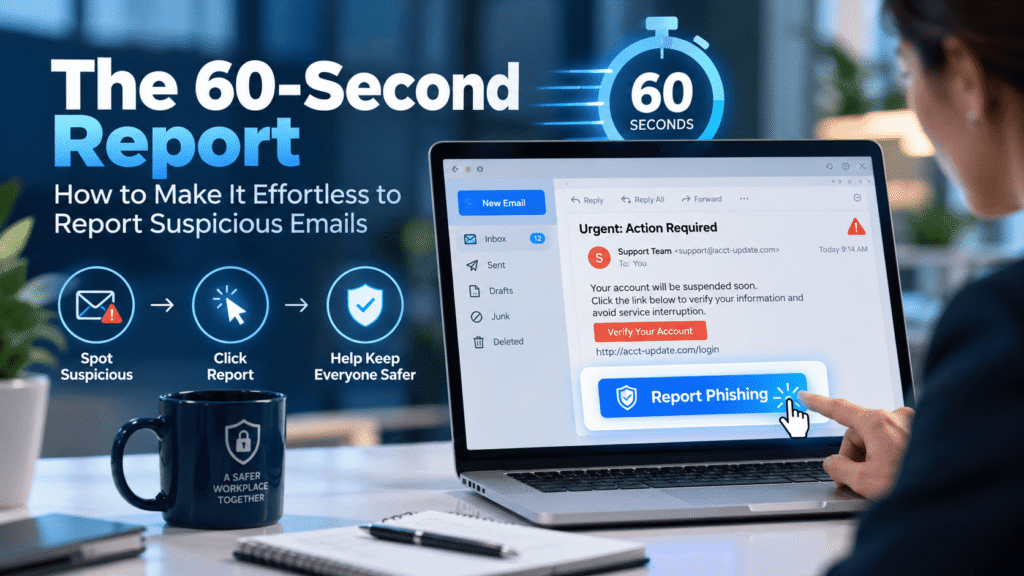
The 60-Second Report: How to Make It Effortless to Report Suspicious Emails
Every security team wants employees to report suspicious emails. Very few teams make it easy. That gap explains why a single unreported phishing message often turns into a full incident investigation days later.
Employees are not careless. Most of them notice something odd. They pause, wonder, and then move on because reporting feels like work. If it takes more than a minute, or requires a decision they do not feel qualified to make, many people simply delete the message and get back to their day.
This article explains how to close that gap. You will see why people stay quiet, what a 60-second reporting standard looks like, and how to build a process that employees actually use. You will also find a practical checklist and a realistic scenario that shows what a fast report is worth.
Why Employees Stay Quiet About Suspicious Emails
Start with a simple observation. Reporting is a favor employees do for the security team. It rarely benefits them directly, and it always costs a little time. When the cost feels higher than the reward, people skip it.
Several things drive that calculation.
The first is doubt. Most people do not feel confident enough to call an email malicious. They think, “It’s probably nothing,” and they do not want to waste anyone’s time. That instinct is understandable, and it is exactly the instinct a good process must override.
The second is fear of looking foolish. Nobody wants to flag a legitimate message from the CEO’s assistant as a scam. In some companies, one embarrassing false alarm is enough to make a person stop reporting for good.
The third is fear of blame. An employee who clicked a link by mistake faces a hard choice. They can admit it and risk a lecture, or they can stay silent and hope nothing happens. Silence often feels safer, even though it is the worst option for the company.
The fourth is plain confusion. Do they forward the email to IT? To a help desk address? To the security team? Does forwarding even work, or does it strip the evidence? When people do not know the process, they usually do nothing.
The fifth is silence on the other end. If an employee reports an email and never hears back, they learn that reporting disappears into a void. The next time, they are less likely to bother.
None of these problems is a character flaw. They are design flaws, and design flaws are fixable.
What the 60-Second Standard Means
The 60-second standard is a design target. From the moment an employee thinks “this looks wrong,” they should be able to submit a report in under a minute. No research, no decisions, no typing a long explanation.
Sixty seconds is not a magic number. It is a way to keep everyone honest. If a new process takes ten steps, or sends the employee to a portal they must log into, it fails the standard.
A good reporting process passes three simple tests.
- One place. Employees know exactly where to report. There is a single button, address, or shortcut, and everyone learns the same one.
- One action. The report takes a single click or tap. The employee does not need to attach files, copy headers, or fill in a form.
- No judgment required. The employee does not have to decide whether the email is truly malicious. “This seems odd” is a good enough reason to report.
That third test matters most. Security teams often say “report suspicious emails” and then quietly expect employees to report only the confirmed bad ones. That expectation defeats the purpose. Analysts, not employees, should make the call.
A Realistic Scenario: Two Mondays at a Logistics Firm
The following scenario is a composite. It reflects patterns that security teams and MSPs see regularly in mid-sized companies.
Dana works in accounts payable at a regional logistics company with about 400 employees. At 9:12 on a Monday morning, she gets an email that appears to continue an existing thread with a long-time supplier. The message says the supplier has changed banks and asks her to update the remittance details before the next payment run.
The sender’s address looks right at a glance. On closer inspection, the domain swaps the letter “m” for “rn”. The attached PDF looks like an official letter. The tone matches previous messages. Something about the urgency feels slightly off, though Dana cannot say exactly why.
Monday, version one
In the first version of this story, the company has no clear reporting path. Dana considers forwarding the email to IT, but she is not sure which address to use. She thinks about asking her manager, who is out until noon.
She also worries. If the email is real and she raises an alarm, the supplier relationship could suffer. If it is fake and she already replied to ask a question, she might look careless.
So she does what many busy people do. She puts the email aside and plans to check it after lunch. Meanwhile, two colleagues in procurement receive the same message. One of them updates the vendor record. The fraudulent payment goes out on Thursday.
The company finds out nine days later, when the real supplier calls about a missing payment. By then the money has moved through two accounts, and recovery is unlikely.
Monday, version two
In the second version, the company has built a simple reporting process. A “Report Suspicious Email” button sits in the toolbar of Dana’s email client. Her onboarding training showed her exactly how it works, and a phishing simulation last quarter gave her a chance to try it.
At 9:14, she clicks the button. A small confirmation appears: “Thanks. The security team has your report and will reply shortly.” The email disappears from her inbox. The whole action takes about ten seconds.
At 9:31, an analyst at the company’s managed service provider sees the report. The analyst checks the headers, notices the lookalike domain, and searches the mail system for similar messages. Two other employees in procurement have received the same email. The analyst pulls all three messages from the mailboxes, blocks the domain, and flags the sender to the finance lead.
At 9:50, Dana gets a reply. It confirms the email was a business email compromise attempt and thanks her for reporting it quickly. The finance lead also calls the real supplier to warn them that someone is impersonating their company.
The entire incident takes under an hour and costs nothing. The difference between the two versions was not Dana’s skill. It was the process around her.
The Friction Points That Kill Reporting
Before you build anything new, audit what already exists. Most organizations have a reporting process of some kind. It is usually just full of small obstacles.
Walk through the process as an employee would, and count the steps. Then look for these common problems.
- Unclear instructions. The policy says “report phishing to the security team,” but never says how. Employees guess, and guesses vary.
- Forwarding as the default. Forwarding an email can strip headers and change the content. It also trains people to pass a live threat to another inbox.
- Too many fields. A web form that asks for the sender, subject, date, and a description feels like a support ticket. Few people finish it.
- No mobile option. Many people read email on their phones first. If the reporting method only works on a desktop client, a large share of suspicious messages never get reported.
- Slow or missing confirmation. An employee who clicks “report” and sees nothing happen is left wondering whether it worked.
- Different processes for different tools. If reporting works one way in the desktop client, another way in the web client, and a third way on mobile, people stop trying to remember.
Fixing even two or three of these will improve your reporting rate. Fixing all of them will change how your employees think about security.
Build a One-Click Reporting Button
The most effective single change is a built-in reporting button. Most major email platforms support one, either natively or through an add-in. Employees do not need to leave their inbox, open a new window, or remember an address.
A good button does several jobs at once.
First, it sends the original message to your security team intact. That means headers, attachments, and links stay in place, which analysts need for investigation. A forwarded copy cannot always offer this.
Second, it removes the message from the employee’s inbox. This reduces the chance that the employee, or someone who shares the mailbox, clicks it later out of curiosity.
Third, it shows a clear confirmation. A short message such as “Report received, thank you” tells the employee that the action worked. It also reinforces the habit.
Fourth, it works everywhere. Test the button in the desktop client, the browser version, and the mobile app. If it fails in one of them, you will hear about it in the form of silence.
If a native button is not possible, offer a fallback. A shared mailbox address such as a dedicated phishing report alias can work, as long as employees know to forward the message as an attachment rather than inline. Even so, treat this as a bridge. A button will always beat an address in terms of speed and consistency.
Finally, put the button where people will see it. Name it clearly. “Report Suspicious Email” works better than a clever brand name or an icon with no label. Employees under time pressure do not decode clever names.
Make Reporting Safe, Not Scary
Technology removes friction. Culture removes fear. You need both.
Start with a clear no-blame message. Employees who click a bad link should feel safe saying so, and quickly. The faster you hear about a click, the more you can contain. Every hour of delay gives an attacker more room to move.
Say this out loud, and say it often. A line in the security policy is not enough. Managers, executives, and team leads need to repeat it in their own words.
Leaders matter more than they usually realize. When a senior person shares that they reported a suspicious email, or even that they almost fell for one, it changes what feels normal. It tells employees that careful people get targeted, and that reporting is a sign of good judgment.
Be careful with simulations, too. If a phishing simulation turns into a way to name and shame people who clicked, employees learn that the security team is an adversary. They will hide mistakes in real situations. Treat simulation results as a learning tool and a way to measure the program, not a way to punish individuals.
Consider tracking a metric that rewards the right behavior. For example, count how often an employee clicked and then reported the email within minutes. That is a good outcome, not a failure. Recognize it as one.
Also remove ambiguity about false alarms. Tell employees plainly that a report on a harmless email costs the team almost nothing, and that a missed report can cost a great deal. People report more when they know “better safe than sorry” is the official policy.
Close the Loop Within the Hour
Reporting is a conversation, not a one-way street. If employees send reports and hear nothing, the habit fades.
Aim to send a human or semi-automated response to every report, ideally within an hour during business hours. The reply does not need to be long. It needs to answer the question employees actually have: was this real?
A good response includes three things.
- A verdict. State whether the message was malicious, a simulation, spam, or legitimate.
- A thank-you. Keep it sincere and brief. People notice when thanks feels like a template, so vary the wording.
- One useful detail. Point out the clue that gave it away, such as a mismatched domain or an unusual request. This turns each report into a tiny lesson.
For example: “Thanks for reporting this. It was a phishing attempt. The sender’s domain imitated our supplier’s by changing one letter. We have removed it from other inboxes.”
Do not overlook the value of a short recap for the whole company. A weekly or monthly note that says “Employees reported 14 real phishing attempts this month, and here is what we learned” makes the program visible. Avoid inventing impressive-sounding totals. Use your own real numbers, even when they are small.
Visibility turns reporting from a private chore into a shared effort. Employees see that their reports matter, and that their colleagues are doing the same.
Triage Without Burning Out Your Team
A better reporting process brings more reports. That is the goal, but it creates a new problem. Someone has to read them.
Many security teams worry about this, and the worry is fair. A flood of reports can overwhelm a small team, especially when most of them turn out to be marketing emails or harmless newsletters. If analysts burn out, response times slip and the whole system loses credibility.
Plan for volume before you launch.
Sort by risk first
Not every report deserves the same attention. Set up simple categories, such as likely spam, likely simulation, credential phishing, payment fraud, and malware. Each category should have a defined owner and a target response time.
Use automation carefully
Automation can help with sorting. It can match known malicious links, flag lookalike domains, and recognize your own simulation emails. It handles repetitive work well.
Still, automation does not replace judgment. It misses new tactics, and it can mislabel unusual but legitimate messages. Treat automated verdicts as a starting point for analysts, and review the edge cases regularly.
Write playbooks
When a report turns out to be real, your team should not improvise. A short playbook for each common scenario saves time and reduces errors. It should cover who pulls similar messages from other mailboxes, who blocks the sender, who contacts affected users, and who informs management.
Clarify roles in an MSP model
If a managed service provider handles triage on your behalf, agree on the details up front. Who sees reports first? What counts as an escalation? Who at the customer’s company gets the call when a payment fraud attempt appears at 4:45 on a Friday?
Ambiguity here wastes the very minutes that fast reporting is meant to save. A one-page escalation guide, reviewed twice a year, solves most of it.
Measure What Matters
You cannot improve a reporting program you do not measure. You also should not drown in metrics. A few well-chosen numbers tell you most of what you need.
- Report rate. What share of employees who receive a suspicious email report it? You can estimate this with phishing simulations, which give you a known number of recipients.
- Time to report. How long does it take from delivery to the first report? Shorter is better, because the first report often triggers containment for everyone else.
- Report accuracy. What share of reports concern real threats? Expect this to start low. A low figure early on is a sign that people feel safe reporting, not a sign of failure.
- Click-then-report rate. How often do employees who click a bad link report it quickly? A rising figure means your no-blame message is working.
- Time to respond. How long does your team take to answer each report? This is a metric for your team, not your employees.
- Variation across departments. Some teams, such as finance and HR, attract more targeted attacks. If those teams report less than others, give them extra attention.
Avoid copying benchmarks from vendor reports or blog posts without checking where they came from. Your own trend line matters more. Compare this quarter to last quarter, and look for steady improvement rather than a specific target number.
Be careful with incentives, too. If you reward the highest number of reports, you may get quantity over quality. A better approach is to recognize the quality and speed of reports, and to celebrate the real catches.
A Practical Checklist for Security Teams
Here is a straightforward checklist you can use to improve how your organization handles suspicious emails. Work through it in order.
- Audit the current process. Ask five employees from different departments to report a test email. Time each attempt and note where they struggle.
- Install a one-click report button. Make sure it works on desktop, web, and mobile.
- Name the button clearly. Use plain language such as “Report Suspicious Email.”
- Set up a fallback. Offer a shared mailbox for devices where the button does not work, and explain how to forward as an attachment.
- Publish a no-blame statement. Have a senior leader sign it, and repeat it in training and onboarding.
- Write short triage categories and playbooks. Assign owners and response targets to each.
- Send a reply to every report. Include a verdict, a thank-you, and one useful detail.
- Run phishing simulations that include the report button. Practice builds habit, and results give you reliable data.
- Share a monthly summary. Report real catches and lessons learned to the whole company.
- Review the numbers each quarter. Adjust based on report rate, time to report, and the click-then-report trend.
You do not have to do all of this at once. If you can only start with three items, choose the button, the no-blame message, and the reply. Those three give the most improvement for the least effort.
Where Cruxroot Fits In
Everything above can be done with careful planning and a modest budget. It also takes sustained effort, and many security teams struggle to keep it up alongside other work. This is where Cruxroot can help.
Cruxroot is a security awareness platform that supports the habits this article describes. It does not replace your processes or your judgment. It gives you tools to practice and measure them.
Phishing simulations let employees rehearse the reporting action in a realistic setting. Because the simulation uses the same report button as a real threat, employees build muscle memory before it counts. You also gain clear data on report rate and time to report, which feeds directly into the metrics above.
Dark web monitoring addresses a different part of the problem. Attackers often craft convincing phishing messages using leaked credentials and personal details. When your team knows which employee accounts have appeared in exposed data, you can prioritize those people for extra guidance and watch their mailboxes more closely. It does not predict attacks, but it shows you where the risk is higher.
Gamified training keeps the topic fresh without turning it into a chore. Short challenges, team goals, and recognition for quick reports make security feel like a shared effort. Done well, this supports the positive culture that makes people report in the first place.
Organizations that work through an MSP or reseller partner can also use Cruxroot to keep reporting consistent across many customers. Shared playbooks, clear reporting data, and a common training approach make it easier to deliver the same quality of service to each one.
If your reporting rate is lower than you want, the most useful first step is to measure it. A simulation can show you where you stand within a few weeks.
Conclusion
Employees see suspicious emails before your tools do. They also see the ones your filters miss. Their reports are among the most valuable signals your security team can receive, and they only arrive if reporting is easy, safe, and rewarded.
Aim for 60 seconds. Put the button where people can find it. Reply quickly, thank them honestly, and never punish someone for raising a hand. Small improvements in each of these areas add up to a company that spots trouble early.
The goal is simple. When an employee thinks “this looks wrong,” the next thing they do should be to report it.
Check our latest the blog regarding Lessons from Real Breaches: What the Human Element Looked Like in Major Incidents
