

The Psychology of Phishing: Why Urgency, Authority, and Curiosity Work
Every security team has met the employee who “should have known better.” They completed the training. They passed the quiz. They still clicked. The usual reaction is frustration, but the more useful reaction is curiosity. Why did a capable, careful person fall for it?
The answer lies in the psychology of phishing. Attackers do not break technology first. They break attention, trust, and timing. A good phishing email works because it targets how people think under normal workplace conditions: busy, interrupted, and eager to help.
This article explains three of the most common psychological levers: urgency, authority, and curiosity. You will see how each one works, what it looks like in a real inbox, and why smart people fall for it. You will also get a practical set of steps your security team can take this quarter.
Why Smart People Click on Phishing Emails
Intelligence does not protect anyone from phishing. Neither does technical skill. Security professionals, engineers, and executives all click on malicious links at some point. The pattern appears in organizations of every size and in every industry.
The reason is simple. Phishing does not test knowledge. It tests behavior in the moment. A person can know exactly what a phishing email looks like and still miss one at 4:45 on a Friday afternoon.
Think about the conditions in which people read email. They switch between tasks every few minutes. They scan subject lines on a phone while walking to a meeting. They answer messages while someone talks to them. Under those conditions, careful analysis is a luxury.
Attackers know this. They design messages for a distracted reader, not a focused one. The goal is to get a reaction before reflection starts.
Blaming users misses the point
Many organizations treat phishing as a user failure. That framing creates two problems. First, it makes employees afraid to report mistakes, which delays response and gives attackers more time. Second, it hides the real issue: the attack is built to exploit normal human wiring.
A better framing treats phishing as a design contest. The attacker designs a message to trigger a quick, automatic response. Your job is to design an environment where the automatic response is “pause and verify” instead of “click and comply.”
That shift starts with understanding what attackers actually do. Let’s look at the mental shortcuts they rely on.
How Attackers Exploit Mental Shortcuts
Human brains run on two broad modes. One is fast and automatic. It handles routine decisions with almost no effort, like replying to a colleague or opening a familiar attachment. The other is slow and deliberate. It checks details, compares facts, and notices when something feels off.
The fast mode does most of the work in a typical day. That is a good thing. Nobody could function if every email demanded full analysis. But the fast mode relies on shortcuts, and shortcuts can be gamed.
A phishing message aims to keep the reader in fast mode. It uses cues that trigger a habit: a familiar logo, a known name, a normal request, a tight deadline. If the reader stays in that mode for a few seconds, the click happens.
Three triggers that do the heavy lifting
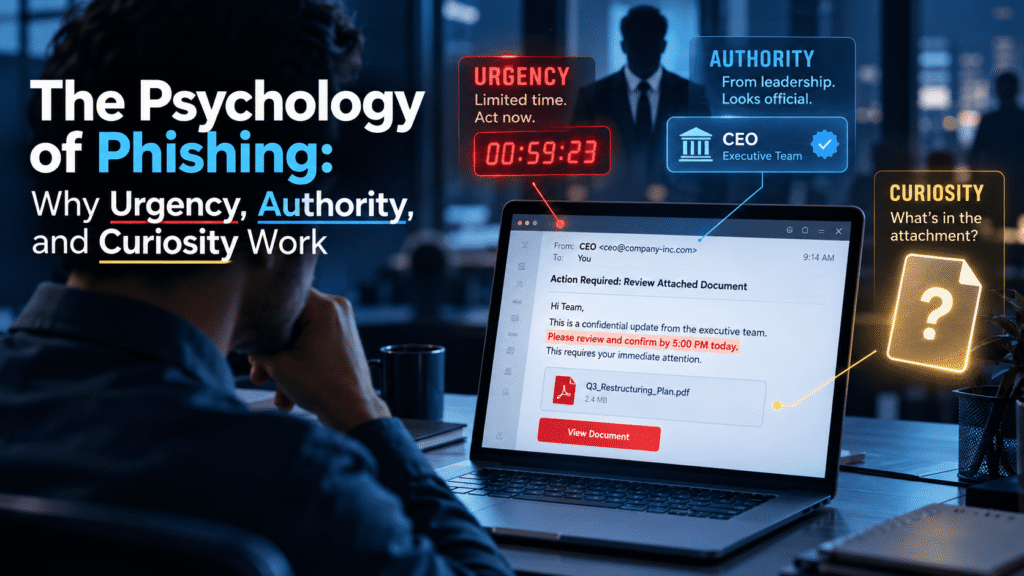
Attackers pull on many psychological levers, but three appear again and again:
- Urgency pushes people to act before they think.
- Authority makes people comply without questioning.
- Curiosity draws people in with something they want to see.
Each one works for a different reason. Each one also leaves different clues. Understanding those differences helps both employees and security teams respond better.
Attackers often combine the three. A message from “the CEO” (authority) about a “confidential acquisition” (curiosity) that needs a reply “within the hour” (urgency) stacks every lever at once. The more levers an email pulls, the more carefully a reader should treat it. We will return to that idea later.
Urgency: The Pressure to Act Now
Urgency is the most common trigger in phishing, and for good reason. Time pressure shrinks the window for careful thought. When people feel rushed, they skip checks they would normally make.
The mechanics are straightforward. A deadline creates stress. Stress narrows focus. A narrow focus makes people fixate on the task, not on the sender’s address or the link destination. The reader’s attention goes to “how do I fix this fast” instead of “is this real.”
What urgency looks like in practice
Urgent phishing messages tend to follow familiar patterns:
- “Your account will be suspended in 24 hours.”
- “Payment failed. Update your details immediately.”
- “Unusual sign-in detected. Verify now to avoid lockout.”
- “Your mailbox is almost full. Act today to avoid losing messages.”
- “Final notice before the invoice goes to collections.”
Notice that each message offers a consequence and a quick fix. The consequence creates fear. The fix, usually a link, offers relief. The reader clicks to make the discomfort go away.
Why urgency works even on trained people
Training teaches people to look for suspicious details. Urgency makes them forget to look. A person who knows to hover over links may skip that step when they believe a deadline is real.
Workplace culture makes this worse. Many employees work in environments where quick responses earn praise and slow ones draw complaints. A message that says “I need this in an hour” fits normal expectations, so it does not raise alarms. The urgency feels like business as usual.
Attackers also pick moments that amplify pressure. They send messages near the end of the day, before holidays, at month end, or during known busy periods such as tax season and audits. Finance teams get “payment overdue” notices around closing dates. HR teams get “urgent candidate documents” during hiring pushes. The timing makes the request feel plausible.
The counter-habit for urgency
The most effective defense is a simple rule: real urgency survives verification. If a request is truly time sensitive, a two-minute check through a separate channel will not hurt anything. If the sender pushes back on verification, that resistance is itself a warning sign.
Teams can reinforce this by making verification normal. When managers say “please double-check anything urgent that involves money or credentials,” employees feel safe taking the extra step. Without that permission, many people worry that checking will look like stalling.
Authority: Why We Obey the Name on the Screen
People follow instructions from those who hold power over them. This is not a flaw. It keeps organizations running. Employees need to act on directions from managers, executives, legal teams, and IT without demanding a justification every time.
Phishing turns that habit into a weapon. When an email appears to come from a senior person or an official body, many readers lower their guard. They think about how to comply, not whether to comply.
Who attackers impersonate
The impersonated authority depends on the target. Common choices include:
- The CEO, CFO, or another executive
- A direct manager or department head
- The IT help desk or security team
- HR or payroll
- Legal counsel or an external law firm
- Government agencies, tax authorities, or regulators
- Well-known vendors and service providers
Each choice taps into a specific kind of deference. An email from “IT Security” saying “your password expires today” works because employees expect IT to send such notices. An email from “the CFO” asking for a quick payment works because finance staff follow the CFO’s directions.
How attackers make authority look real
Attackers do not need perfect forgeries. They need enough realism to pass a quick glance. They copy logos, signatures, and formatting. They use display names that match real people, even when the actual sending address differs. They mimic the tone of internal communication, often short and direct, like an executive typing from a phone.
Public information helps them. Company websites, professional networking profiles, and press releases reveal names, titles, and reporting lines. An attacker can learn who manages accounts payable and who approves wire transfers in under an hour of research. Leaked credentials and breached data sets add more detail, which we will cover in the Cruxroot section.
Attackers also use AI writing tools to polish their messages. These tools remove the spelling errors and awkward phrasing that once gave phishing away. That does not change the psychology. It only removes one clue employees used to rely on. The old advice to “look for typos” is now much weaker than it was.
Why people hesitate to question authority
The real power of authority is social. Questioning a senior person feels risky. Many employees worry about looking incompetent, slow, or insubordinate. If the email says “keep this confidential” or “I’m in a meeting, just handle it,” the pressure to comply grows.
Authority attacks often pair with a request to bypass normal process. “Skip the usual approval, this is time sensitive.” That line should stop any employee cold, yet it persuades because it comes with apparent permission from the top.
The counter-habit for authority
Organizations need to make it safe, and even expected, to verify requests from leadership. A simple policy helps: no payment change, credential request, or sensitive data transfer is valid on email alone, no matter who sends it. Executives should state this publicly and thank employees who follow it.
When leaders model the behavior, the culture changes. An executive who says “if I ever send you an odd request, call me before acting” gives employees a script and a shield.
Curiosity: The Click That Feels Harmless
Urgency and authority push. Curiosity pulls. It works because it does not feel like a threat. The reader does not sense danger. They sense an interesting gap in their knowledge and a quick way to close it.
Curiosity is a strong motivator in everyday work. People want to know about changes that affect them: pay, promotions, layoffs, policy updates, and office gossip. Attackers use that appetite directly.
What curiosity lures look like
Curiosity-based phishing often uses subject lines and file names such as:
- “Updated salary bands 2026 (confidential)”
- “Photos from the company event”
- “You were mentioned in a document”
- “Voicemail from an unknown number”
- “Performance review summary attached”
- “Someone shared a file with you”
These messages avoid any threat. They offer a small reward: information, entertainment, or recognition. The reader’s thinking runs along the lines of “I’ll just take a quick look.”
Why curiosity bypasses suspicion
Suspicion needs a trigger. Urgency and authority messages sometimes set off a mild alarm because they demand something. Curiosity messages demand nothing. They simply sit there, waiting to be opened.
Curiosity also exploits fear of missing out. If a document appears to concern the reader personally, such as pay or job security, leaving it unopened feels uncomfortable. People feel they have a right to know. That emotional pull can override caution.
Personalization sharpens the effect. A message that uses the reader’s name, department, or a recent project feels meant for them. Attackers gather these details from public sources and from earlier data breaches. A lure that mentions a real internal project name will draw far more clicks than a generic one.
The counter-habit for curiosity
Training should teach one question: “Did I expect this?” Unexpected files, shares, and voicemails deserve extra care, even from known contacts. A colleague’s account may be compromised, so a familiar sender name does not guarantee safety.
Organizations can support this by reducing the surprise factor. When HR announces policy updates through a consistent, known channel, employees learn what real communication looks like. A fake message that arrives through a different path stands out more clearly.
A Realistic Scenario: The Invoice That Arrived at 4:47 on a Friday
Concepts become clearer with an example. Here is a scenario that mirrors attacks many finance teams have faced.
Selin works in accounts payable at a mid-sized logistics company. It is the last Friday of the month. She has three reconciliations left and a train to catch. At 4:47 p.m., an email arrives in her inbox.
The display name reads “Mert Aydın, CFO.” The subject line says “Supplier bank details changed, please process today.” The message is short:
Selin, our freight partner has moved banks. Please update their payment details before the end of day so we don’t miss the settlement window. New details attached. I’m boarding a flight shortly, so I can’t take calls. Thanks for handling this quietly.
The levers at work
Look at what the attacker did. Every sentence has a job.
Urgency comes from the deadline: “before the end of day” and “settlement window.” The timing, late on a Friday at month end, makes the deadline feel natural.
Authority comes from the CFO’s name. Selin reports into the finance function, so a request from the CFO carries weight. The short, terse tone matches how senior leaders write on mobile.
Curiosity plays a smaller role here, but it is present. The word “quietly” hints at something sensitive. It nudges Selin to treat the matter as exclusive and discreet, which discourages her from asking colleagues.
The attacker also removed escape routes. “I can’t take calls” blocks the verification step that would expose the fraud. “Handle this quietly” blocks the colleague who might say “that seems odd.”
What a good outcome looks like
Now picture the same scenario at an organization with strong habits and a supportive culture.
Selin notices the request involves a bank detail change, which her company’s policy says must be verified by phone using a number already on file. She feels the pressure of the deadline. She also remembers that her manager told the team, in plain words, “we will never be upset about a delayed payment that turned out to be fraud.”
She calls the supplier’s known contact. They confirm nothing has changed. She forwards the email to the security mailbox using the reporting button. Within minutes, the security team blocks the sender domain and checks whether anyone else received the message.
Nothing about Selin’s intelligence changed between the two versions. The difference was policy, permission, and practice. That is where defenders have real influence.
What a bad outcome looks like
In the other version, Selin updates the details and sends the payment. The money lands in an account controlled by the attacker. By the time the real supplier asks about the missing payment, days have passed. Recovery is unlikely, and the investigation turns into a painful review of who clicked what.
The costs extend beyond the money. Trust inside the team suffers. Selin feels responsible, though the attack was built to succeed against a rushed, well-meaning person. An organization that responds with blame teaches everyone to hide mistakes next time.
Other Psychological Triggers That Reinforce the Big Three
Urgency, authority, and curiosity are the most common levers, but they rarely work alone. Attackers add other triggers to strengthen the effect. Knowing them helps teams recognize layered attacks.
Fear
Fear overlaps with urgency. Messages about legal action, account compromise, or lost data make readers anxious. Anxiety reduces careful thinking. A “security alert” that tells you your account was hacked can ironically trick you into handing over your credentials.
Reward and greed
Offers of bonuses, refunds, gift cards, or prizes work because people like gains. Corporate versions include fake employee benefit updates, expense reimbursements, and loyalty rewards. The reward does not need to be large. It only needs to feel real.
Helpfulness and reciprocity
Most people want to help colleagues. Attackers use this by asking for small favors: “Can you quickly check this file for me?” or “Could you grab this for the meeting?” Refusing feels rude, so people comply. This trigger works especially well against support, reception, and administrative staff.
Social proof
People follow what others seem to do. A message that says “all team members have already completed this form” pressures the reader to join in. A fake shared document that appears to come from several colleagues feels safer because others seem to have used it.
Familiarity
Brands, tools, and workflows that employees use daily make good disguises. A fake sign-in page for a common cloud service or collaboration tool will look routine. The reader’s muscle memory takes over, and the credentials go in without thought.
Why Annual Training and Awareness Posters Fall Short
Many organizations still rely on a yearly training session and a few posters. These efforts have value, but they rarely change behavior alone. The reasons connect directly to the psychology above.
Knowledge fades, habits stay
A one-hour course gives people information. It does not build reflexes. Weeks later, most of the details fade. What remains is habit. If the habit is “answer fast and keep the inbox clear,” then a phishing email fits right in.
Behavior change needs repetition in realistic conditions. People learn to pause by practicing the pause, not by hearing about it once.
Generic examples do not stick
Training that shows old, obviously fake emails teaches people to spot old, obviously fake emails. Real attacks look different. They use current business context, plausible senders, and clean language. Employees need to see examples that match what they actually receive.
Fear-based messaging backfires
Some programs try to scare employees into vigilance. That approach can create anxiety without improving judgment. It can also make people less likely to report incidents. A culture of fear pushes mistakes underground, which is the opposite of what security teams need.
Click rates tell only half the story
Many teams measure success by how few people click on simulated phishing emails. That number matters, but it misses something more valuable: how many people report suspicious messages. A workforce that reports quickly acts as a distributed detection network. One early report can stop an attack before anyone else is affected.
A healthy program tracks both. It watches click rates for risk and reporting rates for resilience.
What Security Teams Can Do Right Now
You do not need a large budget to reduce phishing risk. You need consistent, practical habits. The following steps address the psychology directly.
1. Make verification the default for high-risk requests
Write a clear policy for requests involving money, credentials, or sensitive data. Require a second channel check, such as a call to a known number, before action. Share the policy widely and repeat it often.
2. Give employees explicit permission to pause
Tell people, in plain language, that slowing down is the right move. Leaders should say it out loud. A single sentence like “we would rather check ten real requests than miss one fake one” removes a lot of hesitation.
3. Make reporting fast and easy
Add a one-click report button to the email client. Acknowledge every report, even false alarms. A short thank-you message encourages the next report. Slow or silent responses teach people that reporting is pointless.
4. Run realistic phishing simulations
Build simulations around the triggers covered here. Test urgency with a fake account lockout. Test authority with a spoofed manager request. Test curiosity with a shared document or voicemail lure. Match the scenarios to real roles, because a finance team and a marketing team face different threats.
5. Teach the “three questions” habit
Give employees a short mental checklist they can run in seconds:
- Was I expecting this message?
- Is it pushing me to act fast or stay quiet?
- Can I verify it another way?
Short, memorable prompts work better than long lists of red flags.
6. Train in small, frequent doses
Replace the yearly marathon with short sessions spread across the year. A few minutes each month keeps the lessons fresh. Short formats also fit busy schedules, which improves completion.
7. Protect the accounts attackers want most
Apply stronger controls to roles that handle money, data, and system access. Use multi-factor authentication everywhere possible. Add approval steps for payment changes. Limit who can alter supplier details.
8. Watch for exposed credentials
Attackers often use leaked usernames, passwords, and personal details to make their messages more convincing and to take over accounts. Monitor for company data appearing in breach dumps and underground markets. When you find exposed credentials, force resets and review those accounts for suspicious activity.
9. Treat mistakes as learning, not failure
When someone clicks, respond with support. Ask what made the message convincing. Use the answer to improve training and controls. People who feel safe admitting errors report faster, and faster reports limit damage.
10. Review and adapt regularly
Attack styles change. Review recent incidents, simulation results, and reported messages every quarter. Update scenarios to match what employees actually see. Treat the program as a living process, not a one-time project.
How Cruxroot Supports a Human-Centered Defense
Everything above points to one conclusion: phishing defense works best when it addresses behavior, not only technology. Cruxroot built its platform around that idea, and it delivers through managed service provider partners who support organizations with these needs every day.
Phishing simulations let teams practice the exact situations described in this article. You can run campaigns that use urgency, authority, and curiosity in realistic business contexts, then measure both click rates and reporting rates. The results show where risk sits and which groups need more support. No simulation replaces good judgment, but regular practice helps employees build the habit of pausing.
Dark web monitoring addresses the data side of the problem. Attackers use stolen credentials and personal details to make their lures believable and to break into accounts. Monitoring helps your team spot exposed company information early, so you can reset passwords and close gaps before an attacker uses them. It does not stop every attack, but it narrows the information advantage criminals often hold.
Gamified employee training keeps learning short and engaging. Employees complete brief modules, earn recognition, and see how their habits improve over time. This format supports the repetition that behavior change needs, without turning security into a chore. People engage more when training respects their time and rewards progress.
These tools work best together. Simulations reveal how people respond. Training builds better responses. Monitoring reduces the data attackers can exploit. Your MSP partner can help you set up the program, interpret results, and adjust it as your needs change.
Conclusion
Phishing succeeds because it understands people. Urgency rushes them. Authority silences their doubts. Curiosity lowers their guard. Attackers combine these levers with timing and personal detail, and they refine them constantly.
Security teams cannot remove human psychology, but they can build around it. Clear verification rules, a culture that welcomes pauses and reports, realistic practice, and strong visibility into exposed data all shift the odds. Treat employees as partners in defense, not as the weak link.
Start small. Pick one high-risk process, add a verification step, and tell your team why. Then build from there. Steady, practical progress beats a dramatic campaign that fades after a month.
Check our latest the blog regarding Role-Based Security Training: Why Finance, HR, and IT Need Different Content